








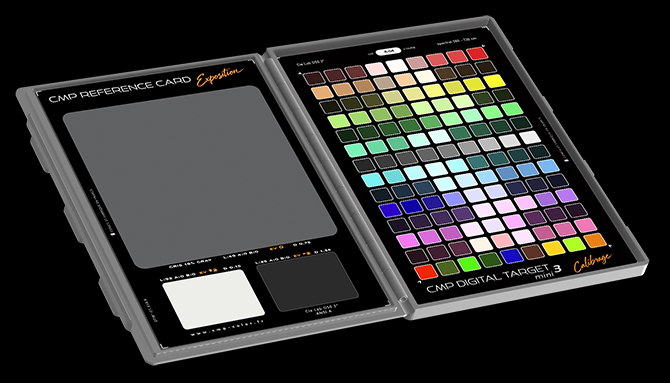
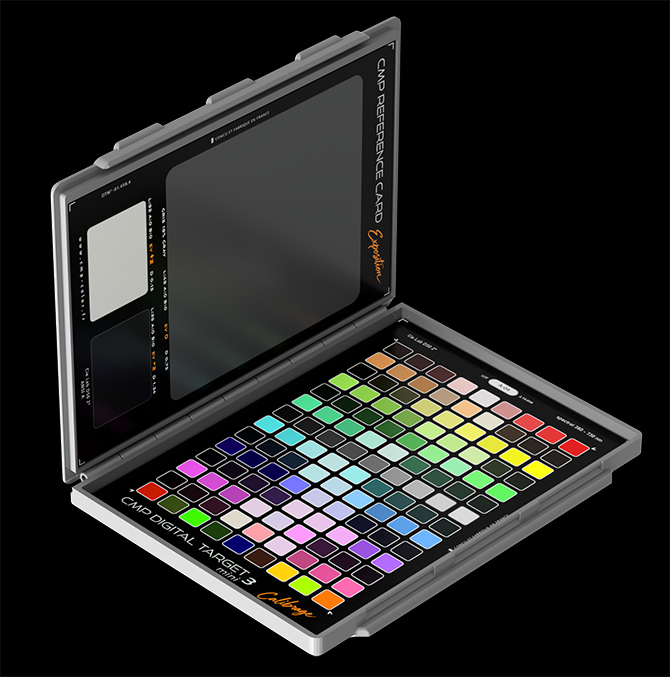
Your CMP Digital Target DUO consists of two panels:
- the left panel ( Exposition ) is used for exposure control
- the right panel ( Calibrage ) is designed for calibrating your digital camera.
Please do not touch the target surfaces with your fingers.
Keep the DIGITAL TARGET DUO closed and protect it from light and air when not in use.
 Calibration Workflow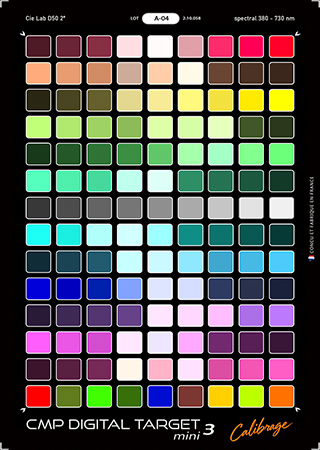
With the purchase of a Digital Target DUO, we provide a custom DCP calibration for one camera body, including three profiles with different rendering styles, compatible with Adobe Camera Raw, Adobe Lightroom and DxO PhotoLab Elite.
Step 1 – Photograph the Target
Photograph your Digital Target DUO, carefully following the instructions in this manual. Correct exposure, uniform illumination and the avoidance of unwanted reflections are essential for obtaining reliable results.
Step 2 – Select and Send Your RAW File
Open your target photographs in Adobe Camera Raw or Lightroom and select the best-exposed image according to the criteria described in this manual. Send us the original, unprocessed RAW file using WeTransfer, following the contact instructions provided below.
Please also include your name and email address. If possible, attach a few additional original RAW photographs taken with your camera, showing a variety of subjects. These images help us assess and refine the rendering of the profiles under real-world conditions.
Step 3 – Custom Calibration
We use your selected target image to perform the color calibration for your camera body and create three DCP profiles with distinct rendering characteristics:
Linear: a linear tonal response.
Soft: a softer, more subtle contrast.
Contrast: a more pronounced contrast.
Step 4 – Receive and Install Your Profiles
Once the calibration is complete, we will email you the three custom DCP profile files, together with instructions for installing them on your system.
You can then select the rendering style that best suits each image and your preferred workflow.
Photographing the targetThe shooting conditions and compliance with certain parameters are essential to achieving high-quality calibration. Correct exposure, uniform illumination, and a shooting angle that avoids unwanted reflections are the key factors in obtaining usable images. The use of a matte substrate for the target makes it easy to photograph.
The procedure is simple: once you have found the correct positioning for your camera and flash unit(s), take a series of photographs of the target, varying the exposure in one-third-stop increments over a wide range, from heavily underexposed to heavily overexposed. Then open your files in Lightroom or Camera Raw to select the images you will send to me.
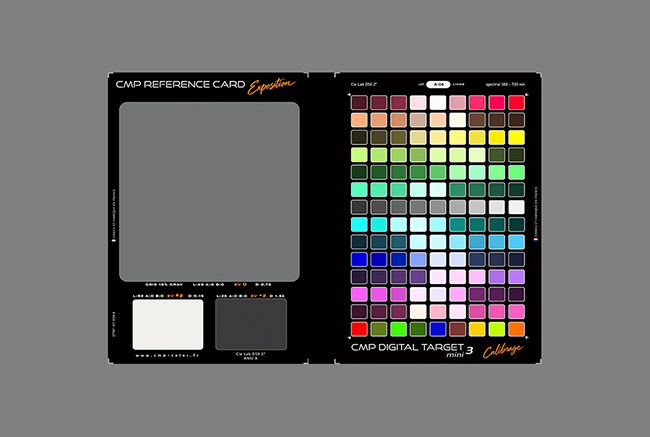
right framing of the target
The use of two studio flashes positioned at 45° is recommended. However, high-quality LED light sources can also be used, provided they have a Color Rendering Index (CRI) greater than 98 and a color temperature between 5000 K and 5500 K.
Suitable LED light sources are available in the CMP online store here.
Ideally, use two studio flashes positioned at 45 degrees on either side of the target, as in a copy setup. Do not use softboxes or any other accessories that could alter the quality of the light emitted by your flashes. You can also use your camera's built-in flash without any problem.
To avoid reflections on the target's surface, switch off all light sources other than your flashes when taking the photographs.
You can also place black fabric around the target to prevent colored reflections from nearby objects from affecting the target colors. Frame the shot so that the target occupies half of the image area, in order to avoid lens vignetting.
Position yourself at an appropriate distance from the target to ensure uniform flash illumination. If the target is placed on a surface, put a piece of black fabric underneath it to prevent the surface from reflecting the flash light.
To check that the lighting is uniform, use your RAW processing software and the eyedropper tool to verify that the RGB values of the black border surrounding the color patches are as similar as possible.
In all cases, it is easier to photograph the target in darkness or under very dim ambient lighting. This ensures that the target is illuminated exclusively by your light sources.
When photographing the CMP Digital Target DUO for calibration, use the following camera settings:
Exposure mode: Manual
Focus: Manual, with the target in sharp focus
ISO sensitivity: Between ISO 100 and ISO 400
Aperture: Approximately f/8
Focal length: A standard or short telephoto lens, typically 50–90 mm for a full-frame (35 mm format) camera
If flash light : flash in manual mode, with TTL disabled, adjust the flash power and/or the aperture setting to control exposure.
Note: When using flash, the shutter speed does not affect the exposure produced by the flash, provided you remain within the camera's flash sync speed. Ideally, set the shutter speed to the camera's maximum flash sync speed. This helps minimize the influence of ambient light and ensures that the target is illuminated primarily by the flash. Adjust the shutter speed as necessary to remain within the camera's flash sync limits.
This procedure involves selecting the best RAW files from your photographs of the target. Examine your RAW files and select those that meet the following criteria.
Open the photographs of the CMP Digital Target DUO in Camera Raw or Lightroom.
Use the eyedropper on the white patch located on the left-hand side of the target to set the white balance.
Check the RGB values of this white patch and choose a file with values approximately as follows:
235 / 240 (RGB) in Camera Raw.
90% in Lightroom.
Make sure that none of the RGB channels exceeds 245 (or 95% in Lightroom).
Send me this original, undeveloped RAW file using WeTransfer, addressed to: metairie.christophe@orange.fr
Please include your name and email address so that I can send you the profiles.
Also, please include a few original RAW files from photographs taken with your camera, preferably showing a variety of subjects. These will help me fine-tune the rendering of your profiles using real-world images.
To obtain high-quality profiles, it is essential to follow the target photography procedure carefully. The quality of the resulting DCP profiles depends entirely on the quality of the target photographs.
Technical note: RGB values in Camera Raw depend on the selected color space and the preview's tonal settings. The 235–240 target is therefore a practical selection criterion, not an absolute RAW sensor value. The RGB values displayed by Lightroom may also depend on the histogram and readout mode.
Exposure Panel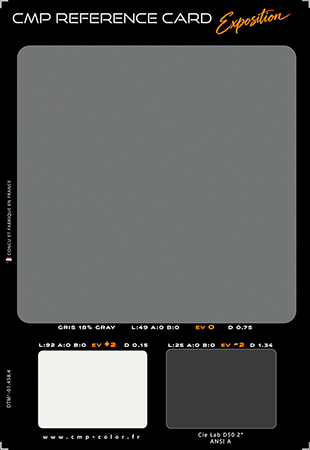
The Exposure panel features three neutral reference patches designed to help you evaluate exposure and tonal reproduction in your photographs. The white patch is also very useful for setting the white balance using the eyedropper tool.
EV −2 — Black (L* 25): Reference for dark tones, two stops below the mid-grey reference.
EV 0 — Neutral Grey 18% (L* 49): The central reference for exposure evaluation.
EV +2 — White (L* 92): Reference for bright tones, two stops above the mid-grey reference.
The grey patch has a reflectance of 18%, which is a standard corresponding to the reference level at which camera light meters are normally calibrated. A spot-meter reading taken from this patch should provide a correct exposure.
The white and black patches are positioned at +2 EV and −2 EV, respectively, relative to the 18% grey patch.
Photograph the CMP Digital Target DUO under the lighting conditions you want to evaluate.
1. Set the white balance
In your RAW processing software, use the White Balance Eyedropper tool and click on the white reference patch (EV +2). This sets the white balance according to the neutral reference under the lighting conditions used for the photograph.
For the most reliable result, ensure that the white patch is correctly exposed and that none of its RGB channels is clipped.
2. Evaluate exposure
Inspect the three reference patches in your RAW processing software to assess how your camera records midtones, shadows and highlights.
The EV 0 grey patch provides the central exposure reference. The EV −2 black patch helps you evaluate the reproduction of darker tones, while the EV +2 white patch helps you assess highlight reproduction and available headroom before clipping.
These three reference patches provide a practical way to check exposure consistency and evaluate tonal reproduction throughout your photographic workflow.
Understanding Exposure in Digital PhotographyIn digital photography, camera exposure meters are not necessarily calibrated to place an 18% grey target at EV 0 in the recorded image.
Unlike traditional assumptions based on a fixed mid-grey reference, digital camera manufacturers take into account the sensor's available dynamic range and, in particular, the need to preserve highlight detail before the sensor reaches clipping.
Depending on the camera and its metering system, the exposure reference may therefore leave a safety margin between the recommended exposure and highlight clipping. This margin can typically be in the region of 2⅔ to 3⅓ stops, although the actual value varies with the sensor, ISO setting and camera metering implementation.
Consequently, a camera's recommended exposure does not necessarily correspond to the same tonal placement for the 18% grey patch across different camera models.
The CMP Digital Target DUO's three reference patches help you evaluate this behaviour, compare exposure results and establish a consistent exposure workflow for your camera.
A comprehensive article on sensor dynamic range and exposure meter calibration is available on this page.
Copyright (c) 2026 christophe metairie photographie - Tous droits reservés